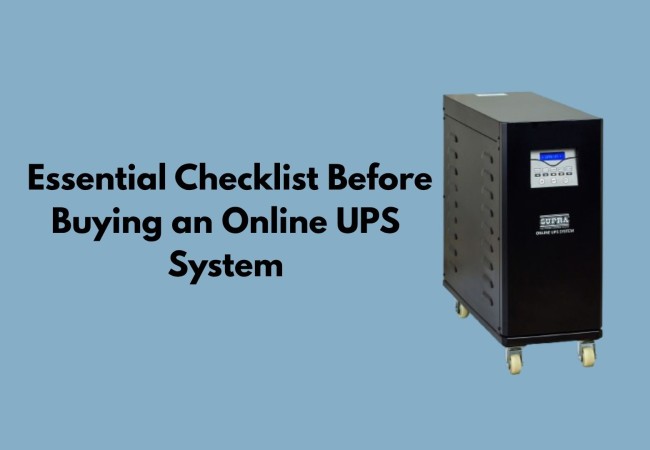
Investing in an online UPS system is a critical decision for businesses that rely on uninterrupted power. From protecting sensitive equipment to ensuring operational continuity, the right UPS system can prevent costly downtime and data loss. However, choosing the right online UPS system requires careful evaluation of various factors.
Why Choosing the Right Online UPS System is Important for Your Business
Not all UPS systems work the same way. An online UPS, also called a double-conversion UPS, continuously converts incoming power so that connected equipment never draws directly from the utility supply. This means zero transfer time during an outage and clean, stable power at all times, which is exactly what sensitive electronics, servers, and medical equipment require. Choosing the wrong system can result in insufficient backup time, overloaded circuits, or simply wasted money on a unit that does not match your actual needs. Making the right choice from the start will protect both your investment and your equipment. Before you buy an online UPS system, use this checklist to help you make an informed choice.
1. Understand Your Power Requirement and Load Capacity
Calculate the total power requirement before purchasing an online UPS system.
- List all equipment that needs backup power, such as computers, servers, machinery, and networking devices
- Check the wattage or VA (Volt-Amps) rating of each equipment
- Add up the total load to determine the required UPS capacity
- Choose a UPS with at least 20 to 25 percent more capacity than your current load to accommodate future expansion
Keep in mind:
- Underestimating load requirements can overload the system and cause failures
- Overestimating unnecessarily increases costs
2. Check the Required Backup Time for Your Operations
The required runtime depends on your operational setup. Consider the following scenarios:
- With an on-site generator: Ten to fifteen minutes of runtime is usually enough to bridge the gap while the generator starts
- Without a generator: Two hours or more of backup time may be necessary to keep operations running
Key points to verify before purchasing:
- Runtime is directly affected by battery capacity and the connected load; heavier loads drain batteries faster
- Check whether the UPS supports external battery modules for runtime extension
- Confirm runtime figures at your actual expected load, not just the unit's maximum rated capacity
3. Evaluate the Type and Quality of UPS Batteries
The battery is the backbone of the UPS system. Here is what to look for:
Battery Types:
- Sealed lead-acid (VRLA) batteries: Dependable, widely available, and cost-effective
- Lithium-ion batteries: Longer lifespan, faster recharge times, better temperature tolerance, though at a higher initial cost
Features to look for:
- Intelligent battery management that monitors charge health and optimises cycling
- Alerts that are sent automatically before a battery dies
- Hot-swappable battery capability for replacement during operation without downtime
Read more: Understanding Battery Backup in Online UPS System
4. Consider UPS Efficiency and Power Factor
Efficiency has a direct impact on your electricity bill and long-term operating costs. Key considerations include:
- A UPS running at 90 percent efficiency loses 10 percent of every unit of power drawn as heat over months and years. This adds up significantly
- Look for systems offering ECO mode, which pushes efficiency above 98 percent during stable power conditions
- ECO mode automatically reverts to full double-conversion when power quality drops
Benefits of high efficiency:
- Lower electricity consumption
- Reduced heat generation inside the facility
- Decreased cooling requirements
- Extended life of internal components
5. Look for Essential Safety Features and Protection Mechanisms
A quality online UPS system should protect connected equipment from far more than just outages. Essential protection features to check for include:
- Overvoltage and undervoltage protection: Regulates output voltage within safe limits
- Surge and spike suppression: Absorbs transient voltage surges before they reach equipment
- Short circuit protection: Automatically disconnects the load during a short circuit
- Automatic bypass: Maintains power flow even if the UPS itself encounters an internal fault
- True sine wave output: Required for equipment with active power factor correction (APFC) power supplies, including most modern servers and desktop computers
A UPS without true sine wave output can cause connected equipment to malfunction or shut down unexpectedly, which defeats the entire purpose of having a UPS.
6. Check Installation Requirements and Available Space
There are different types of online UPS systems. Consider the following before purchasing:
Form factor options:
- Rack-mount: Best suited for integration into server racks or equipment cabinets
- Tower: More practical for standalone placement in offices or plant rooms
Installation requirements to verify:
- Systems above 10 kVA may require dedicated electrical circuits or three-phase power input
- Advance planning with a qualified electrician may be necessary for larger units
- Adequate ventilation clearance is essential; insufficient airflow shortens component life and increases the risk of thermal shutdowns
- Check cable management space and physical accessibility for future maintenance
7. Evaluate After-Sales Support and Maintenance Services
For a UPS system to work well, it needs reliable support after the sale. Check the following before you make your final decision to buy:
- Whether the manufacturer or dealer offers local service engineers
- The typical time it takes for on-site support calls to be answered
- The availability of authentic replacement parts in your area
- If battery health, load levels, and system performance can be tracked in real time using remote monitoring software
Additional support options to consider:
- Preventive maintenance contracts: Particularly valuable for businesses where downtime carries significant financial consequences
- Remote diagnostics: Allows issues to be identified and resolved without waiting for an engineer visit
8. Compare Warranty, Certifications, and Manufacturer Reputation
Before finalising your purchase, evaluate the following:
Warranty:
- Compare warranty periods across different manufacturers; a longer warranty reflects confidence in product quality
- Review battery warranty and main unit warranty separately, as they typically differ
- Confirm whether the warranty covers on-site replacement or depot-based repair
Certifications to look for:
- CE certification
- IEC 62040 compliance
- ISO certification
- RoHS compliance
These certifications confirm that the product has been independently tested against recognised safety and performance standards.
Manufacturer reputation:
- Choose manufacturers with a long, proven track record in power electronics
- Look for customer references within your specific industry
- An established brand is more likely to provide reliable products and dependable long-term support
Also Read: How to Find the Right Servo Stabilizer Manufacturer and Supplier for Your Business Needs
Conclusion: Key Takeaways from the Online UPS Buying Checklist
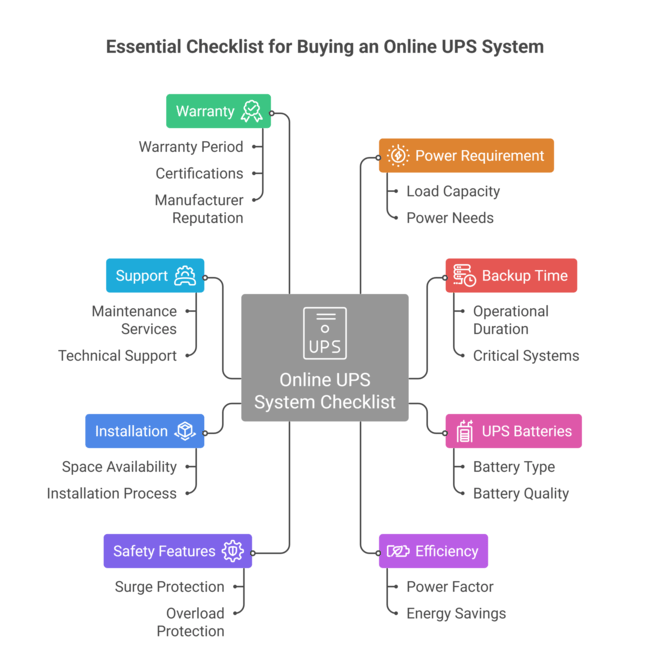
Choosing the right online UPS system comes down to evaluating the right factors before you spend. To summarise, here is what to check:
- Calculate your total load and add 20–25% headroom
- Determine the runtime your operations genuinely require
- Assess battery type, design life, and management features
- Confirm efficiency ratings and ECO mode availability
- Verify all safety and protection features, including true sine wave output
- Check form factor, installation requirements, and ventilation needs
- Review after-sales support, remote monitoring, and maintenance options
- Compare certifications, warranty terms, and manufacturer reputation
For businesses looking for dependable power solutions, Supra Hi-Tech offers a wide range of advanced UPS systems, servo stabilizers, and power management solutions tailored to diverse industry needs. With decades of expertise and a strong commitment to quality, the company has established itself as a trusted provider of power backup systems.